

Description
Download Just a Simple Cloud – Secure, Self-Hosted Cloud Storage for Windows, Mac & Raspberry Pi
Why Just a Simple Cloud Stands Out in the World of Self-Hosted Cloud Tools
In an era where data privacy and control are paramount, Just a Simple Cloud emerges as a refreshing alternative to mainstream cloud services. Developed by Flache GmbH, this Windows utility is designed for users who want full ownership of their data without the complexity of traditional self-hosted solutions. Unlike services that store your files on remote servers controlled by third parties, Just a Simple Cloud allows you to host your own server—ideally on a Raspberry Pi (Models 3 to 5)—giving you complete control over who accesses your files and how they’re secured. The software operates on a simple yet powerful principle: your data stays on your network, and your clients stay updated in real time. Whether you're managing a small business, a creative team, or just organizing personal files, this tool ensures seamless synchronization across devices. With built-in rights management, you can define granular access levels—read-only, write, or full access—for different folders and users, making it ideal for collaborative environments. The ability to run multiple projects simultaneously further enhances its versatility, enabling you to segment data by department, client, or project. What sets it apart is its minimalistic design and focus on functionality over flashy features. There’s no bloat, no unnecessary subscriptions, and no data mining. Just a clean interface, reliable sync, and peace of mind knowing your files are secure and under your control. For users seeking a free, secure, and efficient cloud storage solution that doesn’t compromise on performance, Just a Simple Cloud delivers exactly what it promises.
Powerful Features That Make Self-Hosting Simple and Secure
Just a Simple Cloud isn’t just another file sync tool—it’s a complete, user-friendly ecosystem for managing data on your own infrastructure. One of its standout features is real-time synchronization, ensuring that every change made on one device is instantly reflected across all connected clients. This is particularly valuable for teams working remotely or in distributed environments where up-to-date information is critical. The software supports multiple projects, allowing you to create isolated workspaces for different teams, clients, or initiatives. Each project can have its own set of users, permissions, and folder structures, simplifying organization and reducing the risk of data leaks. Access control is where the tool truly shines: you can assign detailed rights at the folder level, setting permissions for read, write, or even restricted access. This granular control is essential for businesses that need to maintain compliance or protect sensitive information. Another key advantage is its compatibility with Raspberry Pi (Models 3 to 5), making it an affordable and energy-efficient option for home or small office servers. The lightweight footprint ensures smooth performance even on older hardware. The software also supports cross-platform access, with clients available for Windows, Mac, Android, and iOS, so you can access your files from any device. Automatic updates keep the system secure and bug-free, while the intuitive interface minimizes the learning curve. Additional features include encrypted communication, backup options, and a clean dashboard for monitoring activity and user access. Whether you’re a tech-savvy user or someone new to self-hosting, Just a Simple Cloud provides the tools you need without overwhelming you. It’s not just a software tool—it’s a smart, scalable solution for modern data management.
Installation & Usage: Set Up Your Private Cloud in Minutes
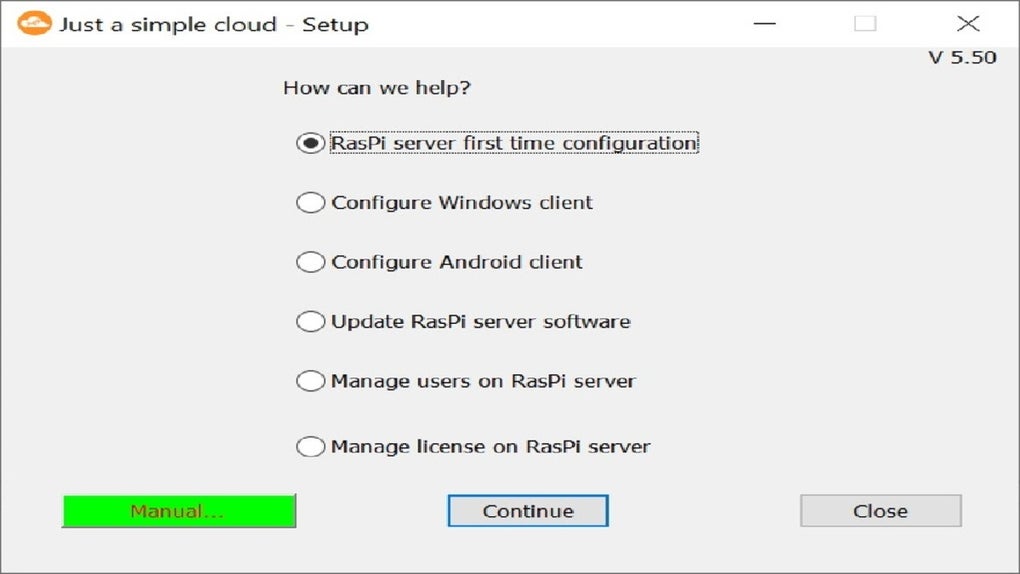
Setting up Just a Simple Cloud is straightforward, even for users with limited technical experience. Begin by downloading the server software from the official Flache GmbH website. The installation package is lightweight and includes all necessary components for running the server on your chosen device. For most users, the recommended setup is a Raspberry Pi (Model 3 to 5), which offers a perfect balance of performance and low power consumption. After installing the OS (such as Raspberry Pi OS), connect the device to your local network and install the Just a Simple Cloud server via the command line or the provided installer. Once the server is running, access the web-based admin panel through your browser using the Pi’s local IP address. From here, you can create your first project, define user accounts, and assign permissions. Adding clients is equally simple: download the appropriate app for your device—Windows, Mac, Android, or iOS—from the official site. Install it, log in with your server credentials, and select the projects you want to sync. The app will automatically detect and connect to your server, starting the synchronization process. You can also set up automatic backups and configure encryption settings for added security. The entire process typically takes less than 15 minutes, and the intuitive dashboard makes ongoing management easy. For advanced users, the software supports command-line configuration and integration with external tools like Nextcloud or custom scripts. Whether you're setting up a personal archive or a team collaboration hub, Just a Simple Cloud streamlines the process with clear instructions and real-time feedback. With regular updates and strong community support, you can trust that your system remains secure and up to date.
Compatibility, Licensing, and Why It’s a Smart Choice for All Users
Just a Simple Cloud is built with flexibility in mind, supporting a wide range of platforms and use cases. The server runs on Windows, Mac, and Linux, making it accessible to most users, while the client apps are available for Windows, Mac, Android, and iOS, ensuring seamless access across devices. This cross-platform compatibility means you can work from your desktop, laptop, tablet, or smartphone without missing a beat. The software is especially well-suited for Raspberry Pi users, thanks to its low system requirements and efficient resource usage. It can run smoothly on a Pi 3 or 4, and even on the newer Pi 5 with enhanced performance. Licensing is another major strength: the tool offers multiple license models, from free versions with basic features to paid tiers that unlock advanced functionality like unlimited users, enhanced security, and priority support. This pay-as-you-go approach makes it cost-effective for individuals, small teams, and growing businesses. The free version is ideal for personal use or small-scale projects, while the paid plans scale with your needs. Importantly, all licenses are transparent and come with clear documentation, so there are no hidden fees. Whether you’re a student managing coursework, a freelancer organizing client files, or a small business owner securing team data, Just a Simple Cloud adapts to your workflow. Its modular design means you only pay for what you use, avoiding the bloat of overpriced enterprise suites. With regular updates, strong security protocols, and a growing user base, this tool is not just a temporary solution—it’s a long-term investment in data autonomy.
Pros and Cons: Is Just a Simple Cloud Right for You?
- Pros:
- Full control over your data with self-hosted server
- Secure, encrypted communication between clients and server
- Granular user rights management and folder-level permissions
- Supports multiple projects and workgroups
- Lightweight and efficient, ideal for Raspberry Pi
- Free version available with solid core features
- Available for Windows, Mac, Android, and iOS
- Regular updates and strong community support
- Cons:
- Requires basic technical knowledge to set up server (especially on Pi)
- Free version has limitations on users and projects
- No built-in mobile app for web-based access (requires app download)
- Limited documentation compared to larger platforms
- Self-hosting means you’re responsible for backups and maintenance
FAQ: Everything You Need to Know About Just a Simple Cloud
Can I use Just a Simple Cloud on a Raspberry Pi?
Yes, Just a Simple Cloud is specifically optimized for Raspberry Pi (Models 3 to 5). It runs efficiently on these devices due to its lightweight architecture, making it an excellent choice for low-cost, energy-efficient self-hosted servers.
Is there a free version available?
Yes, a free version is available with core features like file sync, basic user management, and support for a limited number of projects and users. It’s perfect for personal use or small teams.
How do I update the software?
Updates are delivered automatically through the server and client apps. You’ll receive notifications when new versions are available, and the update process is simple and safe.
Can I use it for business collaboration?
Absolutely. With multiple project support and granular permissions, Just a Simple Cloud is ideal for small to medium businesses looking for secure, customizable collaboration tools.
What operating systems does it support?
The server runs on Windows, Mac, and Linux. Client apps are available for Windows, Mac, Android, and iOS, ensuring full cross-platform access.
Final Verdict: A Smart, Secure Choice for Self-Hosted Cloud Storage
Just a Simple Cloud is more than just a cloud storage tool—it’s a philosophy of data ownership. For users who value privacy, control, and simplicity, this software offers a compelling alternative to commercial cloud services. With its robust rights management, seamless cross-device sync, and support for Raspberry Pi, it strikes the perfect balance between power and usability. While the setup may require a small learning curve, the long-term benefits far outweigh the initial effort. Whether you're a tech enthusiast, a small business owner, or someone who simply wants to keep their files safe, Just a Simple Cloud delivers real value. If you’re ready to take control of your data and avoid vendor lock-in, download Just a Simple Cloud today and experience the freedom of true self-hosting.
Download now and start managing your data securely and efficiently.
Guides & Tutorials for Just a simple cloud
How to install Just a simple cloud
- Click the Preview / Download button above.
- Once redirected, accept the terms and click Install.
- Wait for the Just a simple cloud download to finish on your device.
How to use Just a simple cloud
This software is primarily used for its core features described above. Open the app after installation to explore its capabilities.
User Reviews for Just a simple cloud 0
No reviews found





